 brief
A little more clarity
Your day,
brought into focus.
Capture what matters. See your priorities and meetings in one place.
Download on the App StoreFor iPhone, iPad and Apple Watch.
01 / Capture
Out of your head.
Into Brief.
A thought. A screenshot. A voice memo. Save it in the moment, before the moment moves on.

02 / Remember
The right thing.
At the right time.
Turn what you saved into a reminder. Keep what’s next in sight, right on your Home Screen.

03 / Prepare
Start your day.
A step ahead.
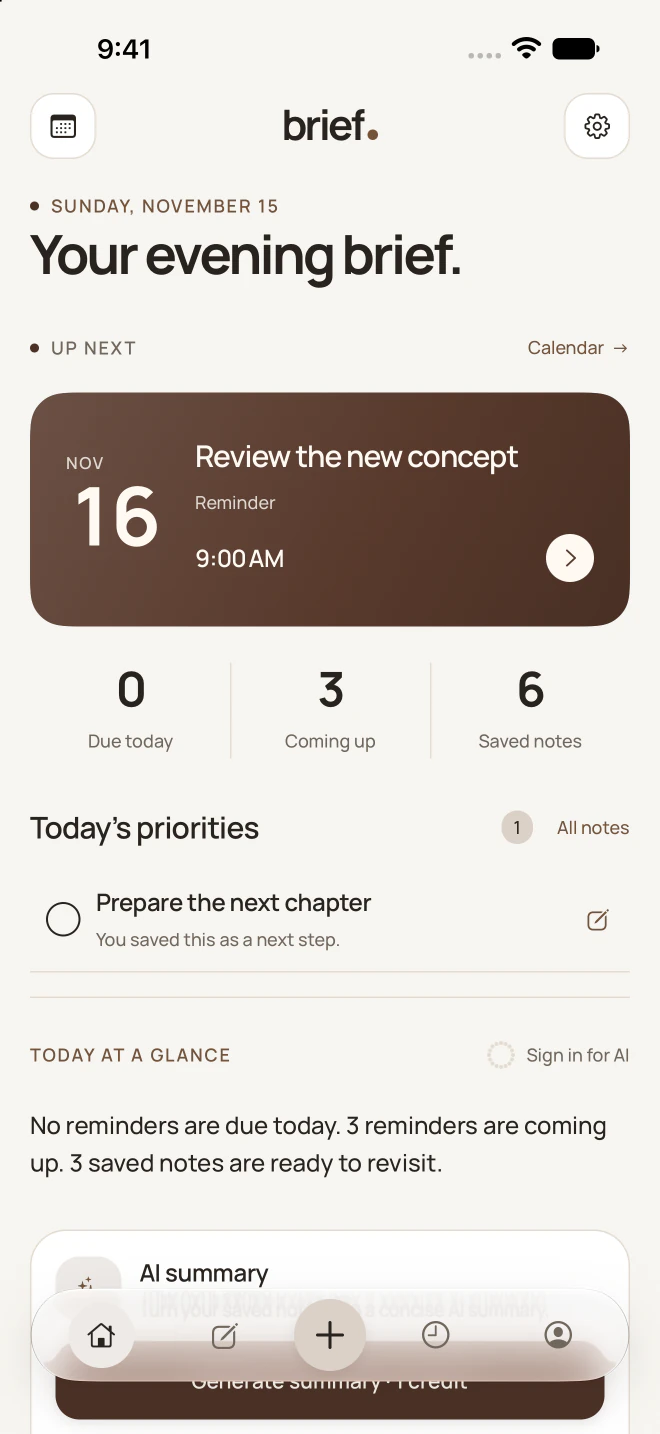
Your priorities, reminders, and meetings. One clear view of the day, ready when you are.
04 / Connect
Your tools.
In good company.
Bring your calendars into view. Save from a chat. Send a next step to your workspace. Connect only what you choose.

BRIEF FOR APPLE WATCH
Good ideas.
Always at hand.
Catch a thought before it goes.
Keep a little room for what’s next.


Actual Brief app · Example events
Your day, a little closer.
A familiar place for your plans and passing thoughts. Open Brief, check what’s next, or start a voice memo.
Real screens from the Brief watch app, with example events. Requires initial setup in Brief on iPhone.
Get to know Brief01 A LITTLE MORE HEADSPACE
A thousand little things.
One clear view.
Thoughts, reminders, and plans have a place to land. Brief brings what matters into focus, so you can get on with your day.
Capture the thought
Remember what’s next
Start the day with clarity

Made to fit your day
A little more connected.
Keep using the tools you love. Brief brings the useful parts together, with you in control.
App screens show demo content.Your calendars.
See events from selected calendars alongside your reminders. Google Calendar access is read-only.
- Apple Calendar
 Google Calendar
Your AI apps.
Create Brief notes and reminders from a chat through an optional connection. See the setup steps for ChatGPT or Claude.
 ChatGPT
 Claude
Your workspace.
Choose a note to export to Notion or Linear, or hand it off as Markdown to Obsidian. Exports stay separate from the original.
 Notion
 Linear
 Obsidian
What Brief does
- Capture in seconds. Save typed notes, screenshots, and voice memos. They’re stored on your iPhone.
- Reminders that fit your day. Turn a note into a reminder with a local notification, and see what’s next in Home Screen and Lock Screen widgets.
- A morning brief. See today’s reminders, priorities, and meetings in one place.
- Optional AI, with your permission. Brief can organize captures, transcribe voice memos, answer questions from your saved notes, and help you prepare for meetings. Brief Pro is an optional subscription for Brief’s AI.
Google Calendar in Brief
Connecting Google Calendar is optional. Brief asks for read-only access to your calendar list and events so it can show the calendars you choose next to your reminders, list today’s meetings in your morning brief, and help you prepare for meetings.
Brief can’t create, change, or delete Google events. Your calendar is stored on your iPhone, not on Brief’s servers. Meeting details reach an AI provider only if you turn on AI meeting prep or follow-up drafts, which send a meeting’s title, time, and location, or if you choose to use AI on a meeting you saved as a note. Brief doesn’t sell Google data, use it for ads, or use it to train AI models. You can disconnect Google at any time.
Available now
A little more headspace.
Starting today.
Free to download for iPhone, iPad and Apple Watch.
Download on the App Store